


I have no textures...
|
screen - https://ibb.co/xqmPZfyh
PC: ryzen7500f 32gb memory ddr5 kingston ssd kingston 1050ti 4gb stormx Zuletzt bearbeitet von goyangi_bialzari22#4441 um 13.12.2025, 23:04:17
|

|
|
To post an image on the Path of Exile (PoE) forums, first upload your image to an image host like Imgur (Imgur.com), get the direct link (ending in .jpg, .png, etc.), then use the forum's image button in your post to embed it. You cannot upload directly to the PoE servers; you must use an external host for the image.
Step-by-Step Guide: Take a Screenshot/Get Your Image: Press F8 in-game to take a screenshot, which saves to your Path of Exile screenshots folder. Upload to an Image Host: Go to a site like imgur.com. Upload your image (drag and drop works well). Get the Direct Link: Right-click the uploaded image on Imgur and select "Copy image address" or "Open image in new tab" and copy the URL from the address bar. Crucially, ensure the link ends in .jpg, .png, or .gif Yes, you also need a tutorial on how to use the Path of Exile forum. Zuletzt bearbeitet von TATIKIS#5543 um 13.12.2025, 23:22:41
|

|
|
when this will be fixed ??
|

|
|
Just for the record, I'm reposting this in this thread as well, because I just realized that this almost always happens after opening the passive skill tree window, or when teleporting to other locations.
Zuletzt bearbeitet von AndreyWar87#5068 um 14.12.2025, 00:35:23
|

|
|
It was fine for a few zones, then as soon as I released Tangmazu it happened again, I was a believer in the >3GB vram usage causing it but this proved that wrong since it happened at 2.7-2.8 vram usage.
before https://ibb.co/wNDqdQbr after https://ibb.co/hFp3HPcj My Laptop specs are: Laptop model: ASUS TUF Gaming F15 FX506HC_FX506HC CPU: Intel i5-11400H @ 2.70GHz RAM: 16GB GPU: NVIDIA GeForce RTX 3050 Laptop GPU (4GB VRAM) Zuletzt bearbeitet von UWutM8#1285 um 13.12.2025, 23:53:32
|

|
" Asus TUF Gaming: Intel(R) Core(TM) i5-11400H @2.70GHz, nVidia 3050 4Gb, SO-DIMM DDR4 32Gb. Textures don't load, the game overloads processor. I checked Task Manager, and the video card is using a maximum of 6% of its capacity, while the processor is maxed out. Zuletzt bearbeitet von Estanima#1464 um 14.12.2025, 04:58:26
|
|
" Thanks you for letting us know that you noticed our problem , now we will know that the problem's solution is in progress |
|
" 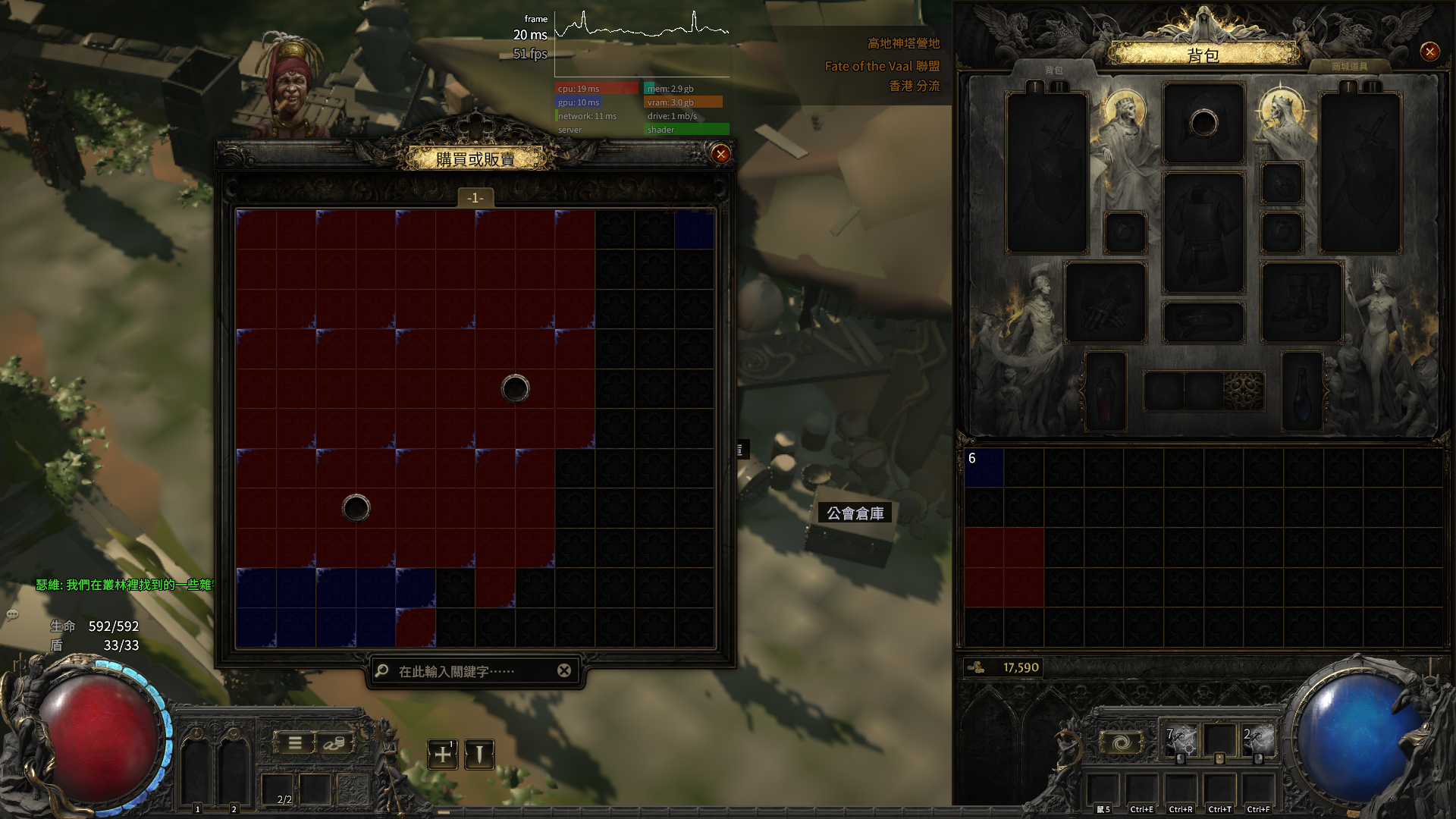 I believe the issue lies in the video memory. An error is consuming a large amount of VRAM, preventing textures from loading. Users with 4GB or less of VRAM are more likely to encounter this problem. This issue only appeared after the update to version 0.4; it never occurred previously. I will play Diablo 4 until this problem is resolved. 12th Gen Intel(R) Core(TM) i5-12450H 2.00 GHz 24.0 GB ram 3050 laptop 4g Zuletzt bearbeitet von yuanzhi#9306 um 14.12.2025, 05:01:35
|

|
" RTX 2060 laptop i5-9300h |
|
" RTX 2060 6GB 7800x3d 1440p 144hz Monitor (1 or 2, no difference) Bazzite 43.2    The MOMENT vRAM goes above 4.5G usage, textures are gone. and the moment it drops below 4.5G they come back.... Didnt see the issue until the server restart around 5pm PST on launch day. I was in A2 at that point, and it would show up frequently on the Caravan. I am still showing shader activity while textures are gone. I have tried doing anything to limit my GPU usage, but no avail. Settings a Min, lowering FPS cap doesnt change it |

|



